Getting started
From an empty Spring Boot project to an ontology-grounded knowledge graph with a web UI and an MCP server, in five steps.
-
Add the starter
One dependency brings the
Cortexbean, the web UI, and the MCP server (plus the Spring MVC and Thymeleaf dependencies the UI needs).Gradleimplementation("ai.chatur:cortex-spring-boot-starter:0.1.3")Maven<dependency> <groupId>ai.chatur</groupId> <artifactId>cortex-spring-boot-starter</artifactId> <version>0.1.3</version> </dependency> -
Supply your ontology, shapes, and rules
Cortex is grounded in your vocabulary. Put three resources on the classpath (defaults shown; each property accepts a list merged in order):
src/main/resources/ontology.ttl— your OWL classes and properties.src/main/resources/ontology.shapes— SHACL shapes ingested data must satisfy.src/main/resources/ontology.rules— Jena rules for inference.
Want a shortcut? You don't have to author an ontology at all — a published standard works as-is. The SKOS tutorial builds a complete controlled vocabulary on the W3C's SKOS Core, with shapes and rules you can copy verbatim.A snippet of the example ontology (namespace
example://ontology#):ontology.ttl@prefix owl: <http://www.w3.org/2002/07/owl#> . @prefix rdfs: <http://www.w3.org/2000/01/rdf-schema#> . @prefix : <example://ontology#> . :Rule a owl:Class ; rdfs:label "Rule" ; rdfs:comment "A rule that can be activated or blocked by conditions and performs actions." . :Condition a owl:Class ; rdfs:label "Condition" ; rdfs:comment "A condition evaluated to determine rule activation or blocking." .Don't want to hand-write RDF? The repository ships cortex-schema, a Claude Code plugin whose/generate-cortex-resourcesskill authors a mutually-consistentontology.ttl,ontology.shapes, andontology.rulesfrom a plain-English description. Add it as a marketplace and install:Claude Code/plugin marketplace add ./cortex-schema-plugin /plugin install cortex-schema@cortex-schema /generate-cortex-resources -
Write a standard Spring Boot application
No Cortex-specific code is required — the starter auto-configures everything.
Java@SpringBootApplication public class MyApplication { public static void main(String[] args) { SpringApplication.run(MyApplication.class, args); } }Then configure Cortex. This mirrors the shipped example — persistent on disk, two merged ontologies, and the MCP server in stateless/sync mode:
application.yamlspring: ai: mcp: server: protocol: stateless type: sync instructions: Use this MCP for knowledge graph operations. Load cortex://ontology resource on connection cortex: persistent: true ontologies: - classpath:ontology.ttl - classpath:skos.ttl shapes: - classpath:ontology.shapes rules: - classpath:ontology.rulesSee the Configuration reference for every property.
-
Run it
Start the app the usual way — it serves on port
8080: the web UI at/and the MCP server at/mcp.Shell# the shipped example ./gradlew :cortex-spring-boot-starter-example:bootRun # or your own app ./gradlew bootRun -
Make your first (reviewed) ingestion
Point an MCP client at
http://localhost:8080/mcpand ask the agent to add some facts. Under the hood it will Lint, then Ingest — which stages the novel triples on a branch. Open/branches, review the staged statements, and click Approve to merge them (or Reject to discard). Only then do they become queryable. See the MCP server guide for client setup and the full tool list.
Web UI routes
The starter serves these pages. The navbar carries a search box — press Enter to search.
| Route | What it shows |
|---|---|
/ | Home — statistics: triples added today, pending branches, asserted and inferred triples, ontology classes, shapes, and rules. |
/ontology | The ontology in Turtle syntax. |
/assertions | The class hierarchy; ?type={class} lists a class's instances, including inferred ones. |
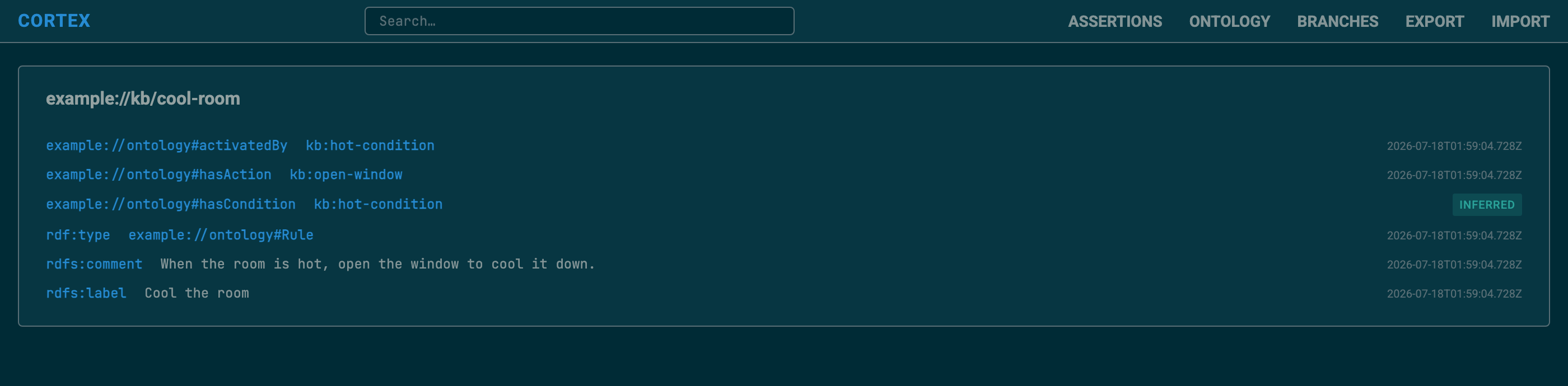
/describe?uri={uri} | Everything known about a resource, with provenance timestamps, and an origin badge — ontology or inferred — on the statements that have none. |
/search?q={text} | Full-text search results. |
/branches | Branches staged by ingestion, awaiting review. |
/branches/{branch} | Staged assertions grouped by subject; edit, rename, Approve, or Reject. |
/export | Downloads the approved assertions as a dated Turtle file (instance data only). |
/import (POST) | Stages an uploaded Turtle document on a branch for review — not a restore. |
/export and /import are not inverses. Export serves
only the approved assertions; import feeds the upload through the same reviewed ingest, so
re-importing an export stages nothing (it is all already approved). Neither is a backup — for
that, see scheduled backups.